AI Product Photography Strategies for Shopify Beauty and Cosmetics Brands
The Hand and Skin Texture Problem is Solved
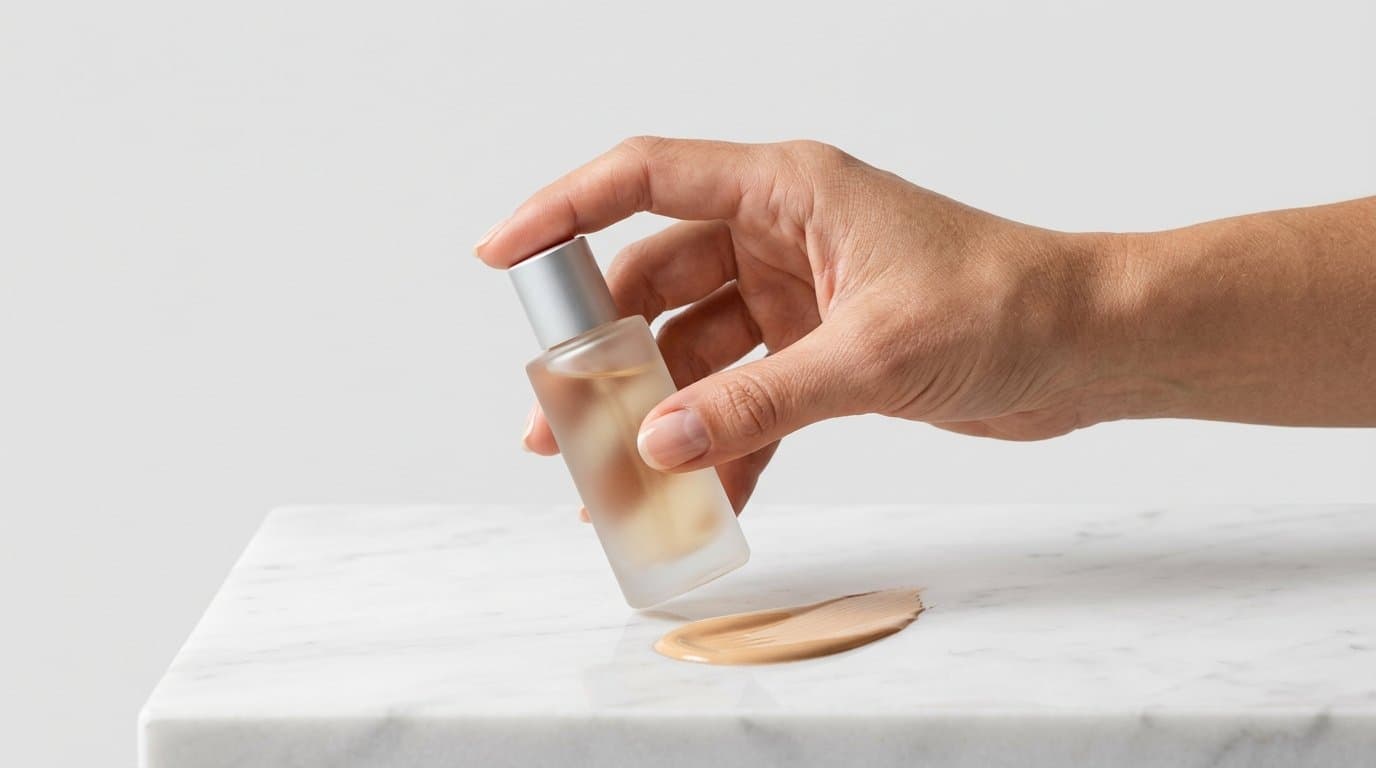
If you run a cosmetics brand on Shopify, you know the absolute frustration of organizing a lifestyle photoshoot. You need a hand model holding a glass bottle of liquid foundation. You want the studio lighting to catch the metallic cap just right. Most importantly, the skin in the photograph needs to look like actual human skin with pores, fine hairs, and natural undertones instead of smooth plastic.
Until very recently, generative AI struggled aggressively with this specific request. We all saw the early results. Hands looked mutated, often featuring six or seven fingers bending at impossible angles. Skin looked heavily airbrushed into oblivion, removing any sense of realism or trust for a beauty consumer.
That changed this August.
Recent breakthroughs in diffusion models like Flux Pro have finally cracked the hardest problems in digital imaging. We are now seeing the ability to render completely anatomically correct human hands interacting naturally with physical products. The models maintain hyper-realistic skin textures that stand up to the extreme zoom your customers use on product pages. This completely alters how DTC beauty brands plan their visual merchandising. You no longer have to choose between burning cash on expensive studio time and settling for artificial-looking renders. The fidelity is finally there.
Scaling Shade Swatches Across Diverse Skin Tones
Capturing accurate makeup swatches is notoriously difficult and expensive. If you launch a new liquid concealer in 24 distinct shades, traditional photography requires you to cast multiple models across a wide spectrum of skin tones. You have to match the lighting perfectly across different days or different setups to ensure the swatches are comparable. The logistics alone can delay a product launch by weeks.
Generative imaging simplifies this process immensely. With the latest rendering engines, you can feed a base image of your swatch and prompt the model to apply it realistically across entirely different complexions.
The trick is specifying the micro-details of undertones in your prompts. Instead of just asking for "dark skin," you specify "deep skin with cool olive undertones" or "fair skin with rosy undertones and visible natural freckles." The AI respects the light physics. It adjusts how a high-gloss lip oil or a matte powder bronzer interacts with different melanin levels. You get a cohesive, beautiful lineup of on-model swatches for your Shopify variant selector. Shoppers see exactly how the product will look on a complexion similar to their own, which directly reduces return rates for mismatched shades.
We've seen merchants take a single flat swatch photo shot on a piece of glass and transform it into a diverse gallery of human arms featuring the product. The cost savings here are massive, but the real benefit is the ability to launch inclusive marketing materials from day one without overextending your production budget.
Capturing Macro Textures: Serums, Creams, and Glosses
Beauty buyers are highly tactile shoppers. They want to know if a daily moisturizer feels rich or if a clarifying toner is watery. Visually communicating that physical texture is critical for conversion.
In a physical studio, getting the perfect smear of a night cream takes dozens of takes. Photographers use acrylic blocks, specialized macro lenses, and sometimes even fake substances like glue or shaving cream to make the texture hold up under hot studio lights without melting. It is a messy, time-consuming process.
Now, you can generate these extreme close-ups digitally with astonishing accuracy. You can instruct the AI to create a macro shot of a thick, opaque cream with a soft peak, resting on a frosted glass surface. For liquid products like a Vitamin C serum, the new diffusion models accurately simulate the way light refracts through the amber liquid and casts a warm shadow on the surface below.
Shooting highlighters or metallic eyeshadows used to require incredibly complex lighting setups to capture the shimmer without blowing out the highlights. Advanced prompting allows you to specify the exact angle of the light source to catch those reflective particles perfectly. We built Modelize specifically to handle this exact workflow, allowing merchants to take a basic smartphone photo of a bottle or jar and output high-end studio macro shots without the fuss of acrylic styling props.
Combining these high-fidelity texture shots with clean lifestyle backgrounds keeps your product detail pages looking incredibly premium. It gives the customer a sensory understanding of the product before they ever open the box.
Staging Premium Vanity Scenes
Props add up fast. Sourcing marble slabs, rare botanical elements, or specific vintage mirrors for a lifestyle shoot drains both budget and creative energy. Sometimes you just need your new eye cream sitting on a damp travertine tile next to a fresh eucalyptus leaf.
Generative tools allow you to conjure these environments on demand. While apps like Photoroom or Pixelcut handle basic background removal and simple template staging well, creating a bespoke, photorealistic vanity scene requires a bit more finesse. You need the reflections to make physical sense.
If your product features a curved chrome pump, the AI must accurately reflect the imagined environment in that metal surface. The August 2026 model updates handle these complex ray-tracing challenges beautifully. The shadows cast by your glass bottle will actually match the direction of the sunlight filtering through a virtual bathroom window.
Try experimenting with very specific environmental descriptors. Tell the model exactly what time of day it is. Prompts like "late afternoon sunlight casting long shadows," "diffused morning light through linen curtains," or "harsh direct flash against a tiled wall" all yield vastly different moods for your brand identity. You can place your serums on a minimalist concrete sink for a clinical skincare vibe, or on an ornate gold vanity for a luxury cosmetic feel, all from the same base image.
Consistency Across the Catalog
A common pitfall we see is merchants going wild with generative capabilities and ending up with a visually chaotic grid. One product shot looks like it was taken in a moody, dimly lit bathroom, while the next looks like a bright, clinical laboratory.
Pick a distinct lighting style and stick to it strictly.
Keep your most successful prompts organized in a spreadsheet for your marketing team to reference. If your brand aesthetic relies on soft, diffused shadows and pastel backgrounds, make sure every generation incorporates those exact keywords. Tools like Claid.ai or Kive.ai are often used by creative teams to manage, categorize, and upscale these visual assets, ensuring the image resolution remains crisp across both desktop monitors and mobile phone screens.
Execution: Practical Strategies for Your Storefront
Applying these generated visuals effectively on your Shopify store requires a strategic approach rather than just replacing every image at once. Here is how we recommend integrating AI-generated photography into your current ecommerce setup.
Start by auditing your existing product pages to identify visual gaps. Do you only have traditional flat lays against a white background? Add an on-model shot showing someone holding the packaging. Are you missing texture close-ups that show the consistency of the product? Generate them to give shoppers more context.
Next, think about actively testing your primary collection thumbnails. Swap out a basic static shot for a generated lifestyle scene featuring realistic hands interacting with the product. Track the click-through rate from your collection pages to your product pages. Often, a dynamic image showing the product in a real-world context captures significantly more attention than a solitary bottle.
Seasonal merchandising also becomes much easier to manage. If you have a holiday sale approaching, a full physical reshoot is entirely unnecessary. Drop your existing product assets into a winter-themed prompt with some subtle frost, warm candlelight, or festive metallic props. Your entire catalog can adopt a completely new seasonal aesthetic in a single afternoon.
The Shift in Visual Merchandising for Cosmetics
Online beauty shoppers rely entirely on the images you provide to make their purchasing decisions. They scrutinize the smallest details. The newfound ability to render a human hand with natural skin folds, actual pores, and realistic nail beds holding your product changes the dynamic entirely. It bridges the gap between digital convenience and physical trust.
You are no longer restricted by massive production budgets. The barrier to entry for top-tier visual branding has effectively disappeared. Independent beauty merchants can now populate their stores with the exact same caliber of imagery as massive international conglomerates. All it takes is a solid understanding of how to guide the latest diffusion models and a clear vision for your brand identity.
Start small. Pick one underperforming product page, generate a fresh batch of macro textures and realistic on-model swatches, and watch how your customers respond to the upgraded visual experience.
More in Industry Guides
View all
AI Product Photography for Food and Beverage Brands
How food and beverage e-commerce brands can use AI photography to create appetizing product images that drive online sales and reduce production costs.
The Complete Guide to AI-Generated Fashion Models for Product Shoots
Explore how AI-generated fashion models are revolutionizing product photography, from virtual try-ons to diverse representation and ethical considerations.
AI Product Photography for Jewelry, Accessories, and Small Items on Shopify
Specific tips and techniques for using AI product photography on jewelry, watches, sunglasses, and small accessories. Get the details right for high-value items.
Generate Stunning Product Photos with AI
Modelize is a Shopify app that creates professional product images in seconds - AI models, backgrounds, and more. No photoshoot needed.