AI Background Removal for Product Photos: The Complete Guide
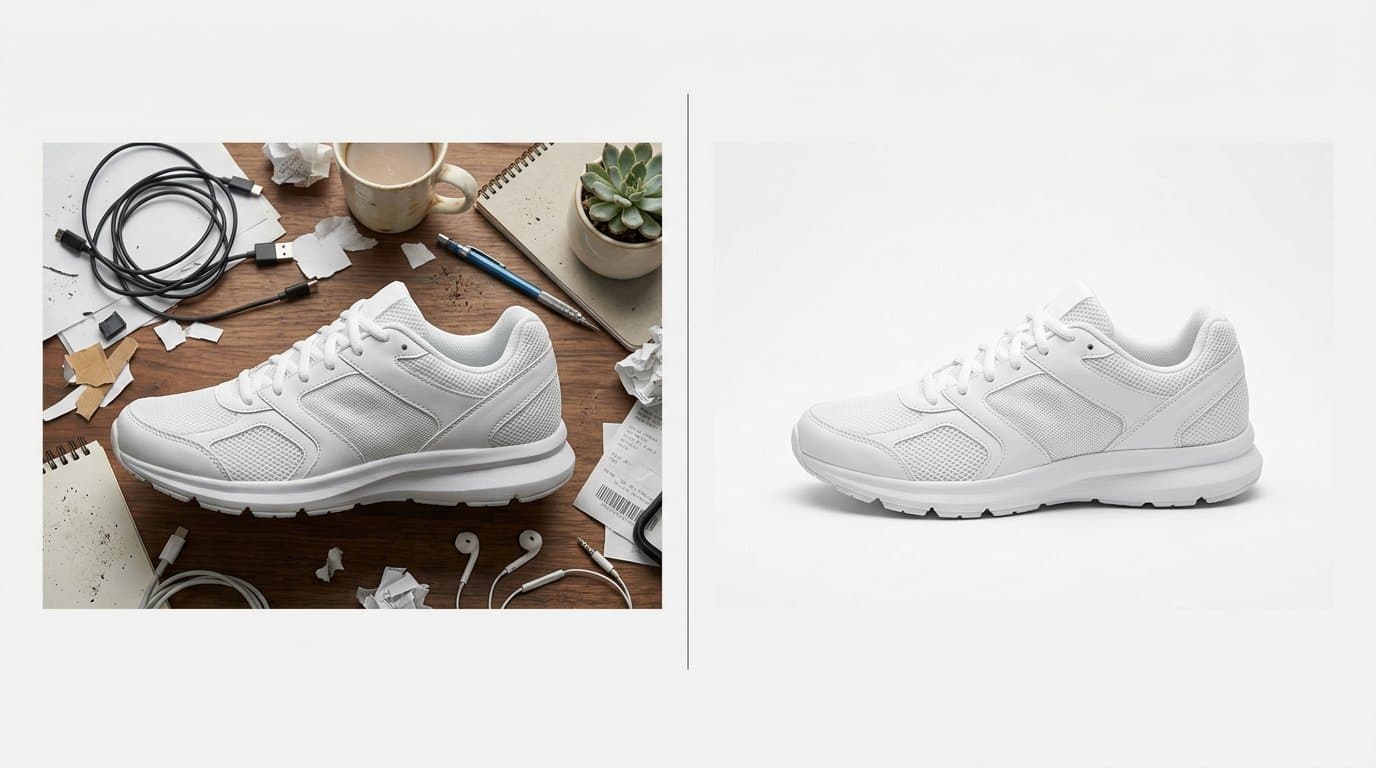
Why Background Matters More Than You Think
When a shopper scrolls through your Shopify store, the first thing they notice isn't the product itself — it's the overall feel of the image. A cluttered, inconsistent, or distracting background can make even a great product look cheap or untrustworthy.
Clean backgrounds create a professional impression instantly. They direct the customer's eye exactly where it belongs: on the product. And in a marketplace where attention spans are measured in seconds, that focus is everything.
The Problem with Traditional Background Editing
Before AI entered the picture, removing or replacing backgrounds was a manual process. Designers would painstakingly trace around products in Photoshop, dealing with complex edges like hair, transparent materials, or intricate jewelry details.
This process had serious drawbacks. It was slow — a skilled editor might spend 15 to 30 minutes per image on complex products. It was expensive, especially when outsourced. And results were inconsistent, with visible halos, rough edges, or missed details that made the final image look artificial.
For a store with hundreds or thousands of products, manual background removal simply doesn't scale.
How AI Background Removal Works
Modern AI background removal uses deep learning models trained on millions of images to understand the difference between the subject and the background. The process happens in three stages.
First, the AI performs semantic segmentation — it identifies every pixel in the image and classifies it as either "product" or "background." Advanced models handle difficult cases like transparent glass, wispy fabric edges, and fine hair strands with remarkable accuracy.
Second, the AI creates a precise mask around the product. This mask defines exactly which pixels to keep and which to remove, including partial transparency for semi-transparent edges.
Third, the background is removed or replaced with your chosen alternative — pure white, a custom color, a gradient, or an entirely new scene.
Pure White Backgrounds for Marketplace Compliance
Many marketplaces have strict image requirements. Amazon requires a pure white background (RGB 255, 255, 255) for main product images. Google Shopping favors clean white or light grey backgrounds. Even Shopify's own design guidelines recommend white or neutral backgrounds for product listings.
AI background removal makes compliance effortless. Instead of setting up a white sweep in a studio or spending time in post-production trying to achieve perfectly even white, AI handles it automatically with pixel-perfect accuracy.
This is particularly valuable for sellers who list across multiple platforms and need consistent, compliant images everywhere.
Beyond White: Creative Background Replacement
While white backgrounds are essential for main product images, lifestyle and contextual backgrounds drive engagement on social media, advertisements, and secondary product images.
AI doesn't just remove backgrounds — it can replace them intelligently. Place your sneakers on a city street, your skincare products in a spa setting, or your kitchen gadgets on a marble countertop. The AI handles lighting adjustment and shadow generation to make the product look naturally placed in the new scene.
This opens up creative possibilities that would traditionally require elaborate sets, location shoots, or expensive composite photography.
Edge Quality: What to Look For
Not all background removal tools produce equal results. The quality of the edge — where the product meets the background — is what separates amateur results from professional ones.
Look for clean edges without visible halos or fringing. Semi-transparent areas like glass, mesh, or thin fabric should retain their natural transparency. Shadows should be handled intelligently, either preserved for a natural look on white backgrounds or regenerated for new backgrounds.
Hair and fur are particularly challenging. Lower-quality tools produce harsh, blocky edges around these fine details. Better AI models preserve individual strand definition, creating results that look naturally photographed rather than digitally processed.
Batch Processing for Large Catalogs
The real power of AI background removal shows when you need to process hundreds or thousands of images. Manual editing at that scale requires a team of editors and weeks of work. AI can process the same volume in hours.
For Shopify merchants with large catalogs, batch processing means you can refresh your entire product photography library without the traditional bottleneck. New arrivals can go live with professional-quality images the same day they're photographed.
With Modelize, background removal and replacement are built into the product photography workflow. You can process images individually or in bulk, and results sync directly to your Shopify listings.
Tips for Best Results
While AI background removal is impressively accurate, a few practices will help you get the best possible output.
Photograph products with good contrast against their current background. A dark product on a dark background gives the AI less information to work with. Ensure even lighting to avoid hard shadows that might confuse the edge detection. Avoid extreme close-ups where the product fills the entire frame — leave some space around the edges.
When possible, use the highest resolution source images available. AI works better with more pixel data, especially for fine details and edges. And always review results at full zoom on difficult areas before publishing.
Impact on Conversion Rates
Consistent, professional product imagery directly impacts your bottom line. Studies show that products with clean, professional backgrounds see 20 to 30 percent higher click-through rates compared to those with cluttered or inconsistent backgrounds.
This effect compounds across your entire catalog. When every product has the same clean, professional presentation, your store looks trustworthy and established — qualities that influence purchasing decisions even when shoppers aren't consciously aware of it.
Getting Started
AI background removal has become accessible enough that any Shopify merchant can start using it today. Whether you have ten products or ten thousand, the technology scales to match your needs.
Start with your best-selling products or newest arrivals. Process a batch, compare the results against your existing images, and measure the impact on engagement and conversions. Most merchants see immediate improvements in the visual quality and consistency of their listings.
The technology is only getting better. As AI models continue to improve, the gap between AI-processed and studio-shot product photography continues to narrow — making professional-quality imagery accessible to businesses of every size.
Generate Stunning Product Photos with AI
Modelize is a Shopify app that creates professional product images in seconds - AI models, backgrounds, and more. No photoshoot needed.