How to Localize Your Shopify Product Photos for Global Markets Using AI
Why Cross-Border Margins Just Shrank (and What to Do About It)
Selling internationally got significantly more expensive this month. If you ship out of the United States or into Europe, the July 2026 regulatory and logistical shifts are likely eating into your bottom line right now. On July 1, the EU effectively killed its €150 de minimis customs duty exemption, replacing it with a temporary €3 flat fee per item. Less than two weeks later, the USPS rolled out its own summer rate hikes, pushing the cost of domestic and international fulfillment even higher. They even bumped overweight fees up to $200 for oversized packages.
The math for cross-border e-commerce is suddenly far less forgiving.
When landed costs spike, DTC brand owners usually default to two defensive maneuvers. They either hike their retail prices to compensate for the new duties and shipping rates, or they aggressively cut their advertising budgets in secondary markets. Both tactics hurt top-line growth.
We take a different approach with the brands we consult. Instead of retreating from global sales, you fix the unit economics by squeezing more efficiency out of the traffic you already get. You need to boost your international conversion rate. If you can get a shopper in Berlin or Tokyo to convert at 3.5% instead of 2.1%, you can absorb that new €3 EU duty and the USPS pricing changes without losing profitability.
One of the highest-leverage ways to drive that conversion bump is visual localization. Shoppers buy what they can picture in their own lives. We are going to walk through how to build region-specific lifestyle photography for your storefront using generative AI, avoiding the massive costs of international photoshoots.
The Psychology Behind Regional Context
Let's talk about why generic photography suppresses international sales. Imagine you sell high-end linen bedding. Your primary market is the US, so your flagship product photos feature a sprawling California king bed in a sun-drenched, open-concept Malibu bedroom. The lighting is warm. The windows are massive.
Now put yourself in the shoes of a shopper in London or Tokyo browsing that exact same product page.
The imagery feels slightly alien. A London flat typically features softer, more diffused window light and tighter architectural constraints. A Tokyo apartment often leans into minimalist space planning, neutral wood tones, local interior trends, and highly functional layouts. When the visual context clashes with the buyer's reality, cognitive friction goes up. They struggle to visualize the linen in their own space.
A few years ago, fixing this required an astronomical budget. Brands would hire local creative agencies, fly samples overseas, rent regional Airbnbs, and pay day rates to local stylists. A single European lifestyle shoot could easily burn through twenty thousand dollars before a single ad went live. Only enterprise retailers could afford true visual localization.
AI product photography completely destroyed that barrier.
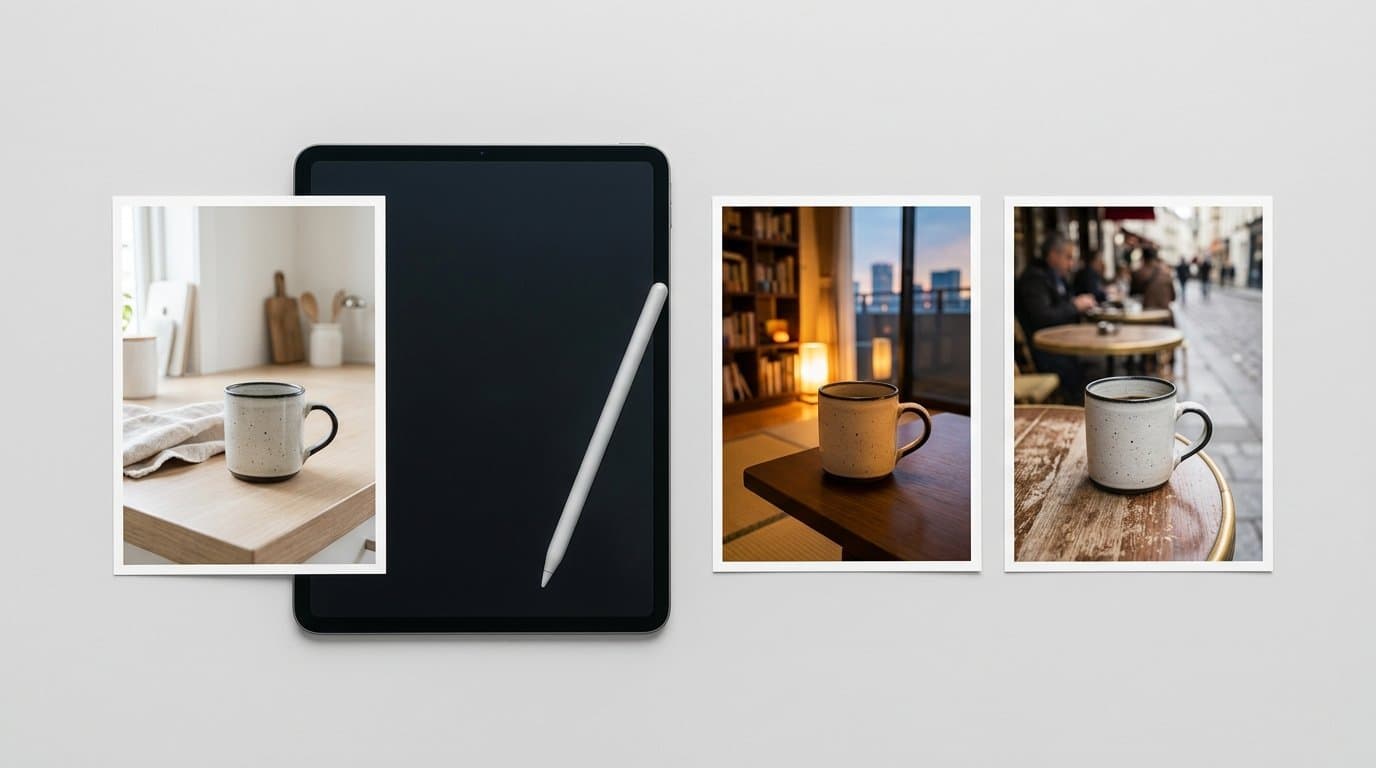
Using the right generative workflow, a single flat-lay or studio shot of a ceramic matcha bowl can be instantly placed into a cozy Kyoto tearoom or a sleek Manhattan loft. The lighting, shadows, and reflections adapt automatically. You get localized context for a fraction of a cent per image.
Mapping Generative Scenes to Shopify Markets
Knowing you can generate these images is one thing. Actually operationalizing them across a global storefront requires a structured approach. Shopify Markets allows you to create distinct shopping experiences for different regions. You can leverage this architecture to serve localized imagery directly to the right buyer.
First, identify your top international regions by traffic volume. Do not try to localize for twenty different countries at once. Start where the data shows you already have a foothold but suffer from a lower-than-average conversion rate.
Next, establish a visual profile for each of those regions. We recommend building a simple mood board that defines the architectural cues, lighting preferences, styling props, and color palettes associated with the area. If you target Scandinavia, your profile might specify pale oak surfaces, functionalist furniture, high-contrast cool lighting, and sparse decoration. For a Mediterranean market, you might document terracotta tiles, harsh afternoon sunlight, coastal textiles, and vibrant organic props like fresh citrus.
Then comes the production phase. You take your base product images (the clean, well-lit studio shots you already have) and run them through an AI generator. Whether you use Photoroom, Pixelcut, or Modelize to handle the heavy lifting, the goal is to batch-produce lifestyle variants that adhere strictly to those regional visual profiles.
Once you have your assets, you upload these localized photos to your store. You manage this through Shopify's contextual pricing and catalog features, assigning specific hero images to specific regional Markets. When a shopper from Oslo lands on your waterproof trench coat page, they see the coat photographed against a rainy cobblestone street scene. A shopper from Miami sees the exact same coat, but the background features a breezy boardwalk during a sudden summer downpour.
You can also use these localized images for your international Meta and Google ad campaigns. Driving traffic from a locally relevant ad creative to a perfectly matched, localized product page creates a high-trust customer journey.
Beyond Backgrounds: Localizing Models and Flat-Lays
Visual localization goes deeper than just swapping out a background environment. Different markets respond to entirely different presentation formats.
If you sell apparel, on-model photography is heavily influenced by regional fashion norms. A styling choice that reads as chic and effortless in Paris might look under-styled or messy to a buyer in Seoul. Historically, re-shooting apparel on different models to match regional aesthetics was cost-prohibitive for all but the biggest fast-fashion conglomerates. Today, you can take a standard ghost mannequin shot or a base model photo and use AI tools like Claid.ai or Kive.ai to generate entirely new, culturally aligned models wearing your garments. You can adjust the styling and the pose context to match the specific Shopify Market you are targeting.
The same logic applies to flat-lay photography. The props surrounding your product signal exactly who the product is for.
Imagine you sell a high-end French press coffee maker. A flat-lay aimed at the US market might feature a heavy ceramic diner mug, a scattered pile of dark roast beans, a worn wooden spoon, and a folded cloth napkin. If you want to sell that same French press in Italy, your flat-lay prompt should generate delicate espresso cups and perhaps a classic Italian daily newspaper peeking out from the corner. You alter the perceived identity of the product simply by changing the company it keeps in the photo.
By combining contextual backgrounds, localized on-model presentations, and regionally accurate flat-lays, you create an immersive shopping experience. The buyer feels understood.
Prompting for Cultural Authenticity
Writing effective prompts for regional product photography is a specific skill. You cannot just type "coffee mug in France" and expect a usable asset. The AI will often spit out a highly stereotyped image featuring a glowing Eiffel Tower hovering unnaturally right outside the kitchen window.
Subtlety creates authenticity.
Focus your prompts on micro-environmental details rather than massive geographical landmarks. Describe the light source, the surface material, and the surrounding objects.
Here is an example of a weak prompt: A leather messenger bag on a table in London.
Here is how you rewrite that for a genuinely authentic output: A premium leather messenger bag resting on a distressed mahogany pub table. Soft, overcast natural light filtering through a rainy Victorian bay window. A half-empty pint glass and a folded broadsheet newspaper sit out of focus in the background. Photorealistic, 85mm lens, depth of field.
Notice the difference. The second prompt relies on atmospheric cues to imply the location. You tell the engine exactly what materials and weather conditions to simulate. This prevents the generative model from relying on cartoonish clichés.
Lighting is arguably the most critical variable to control in your prompts. Global lighting conditions vary drastically. The golden hour in Sydney looks entirely different from a winter morning in Stockholm. Use descriptive terms like "diffused ambient light," "harsh direct sunlight," or "warm incandescent indoor lighting" to match the actual climate and typical interior design choices of your target market.
Avoiding the Uncanny Valley
Generative imagery is incredibly powerful, but it still requires a critical eye. If you blindly upload batch-generated photos without quality control, you risk damaging your brand trust. Consumers are getting much better at spotting lazy AI work.
Scale remains a common issue. Sometimes a model will generate a beautifully styled vanity for your skincare serum, but the bottle will appear the size of a fire extinguisher relative to the sink. Always double-check spatial relationships. If the product looks like a miniature or a giant, discard the output and regenerate.
Consistency between the original product lighting and the generated background is another frequent pitfall. If your source image was shot in a studio with a bright flash coming from the left, you cannot place that product into a background where the sun is clearly setting on the right. The shadows will contradict each other. The human brain instantly flags this physical impossibility, even if the shopper cannot consciously articulate why the image looks "fake."
Always match your background prompt to the lighting baked into your original product shot.
You also need to watch out for prop hallucinations. AI models sometimes invent bizarre objects that do not exist in the real world. Inspect the background elements of every lifestyle scene before assigning it to a Shopify Market.
Measuring the Financial Impact
You cannot improve what you do not measure. Once your localized images are live across your Shopify Markets, you need to track whether this effort is actually offsetting those new July shipping and customs costs.
Keep a close eye on your session-to-add-to-cart rate for the specific regions you localized. This metric isolates the effectiveness of your product page before shipping costs and cart fees muddy the waters. If your visual merchandising is working, shoppers will feel more confident adding the item to their cart early in the session.
You should also monitor the time spent on page. Highly relevant, localized lifestyle photography tends to hold user attention longer than a sterile white background. When shoppers can visualize how an item fits into their daily routine, they linger. They zoom in on details.
Consider running a clean A/B test for your highest-traffic international market. Serve your standard US-centric lifestyle images to fifty percent of the traffic in that region, and serve the newly generated AI localized images to the other half. Let the test run for two to three weeks. In our experience, merchants often see a double-digit percentage lift in conversion rate on the localized variants.
Selling across borders in 2026 demands a tighter operational strategy than it did five years ago. You can no longer rely on cheap shipping or duty exemptions to pad your margins. You have to earn every single international conversion. By leveraging AI to craft culturally relevant, visually stunning product pages, you give global buyers a compelling reason to trust your brand and complete the checkout.
More in Shopify Growth
View all
How to Adapt Your DTC Product Photos for Shopify B2B Channels Using AI
With Shopify rapidly expanding its B2B capabilities, consumer brands are opening wholesale portals. Learn how to use AI to instantly transform your DTC product photos into bulk, retail-ready B2B imagery.
How to Add AI Virtual Try-On to Your Shopify Store
A practical guide to adding virtual try-on and size recommendation to a Shopify fashion store with OptiDress, from choosing the right type of try-on to setup, placement, and measuring results.

How AI Product Photos Protect Shopify Dropshippers from Reverse Image Search
Stop losing sales to AliExpress and Temu. Learn how transforming generic supplier images with AI photography breaks the reverse-search trail and protects your store's margins.
Generate Stunning Product Photos with AI
Modelize is a Shopify app that creates professional product images in seconds - AI models, backgrounds, and more. No photoshoot needed.