How to Capture Visual Search Traffic on Shopify Using AI Image Variations
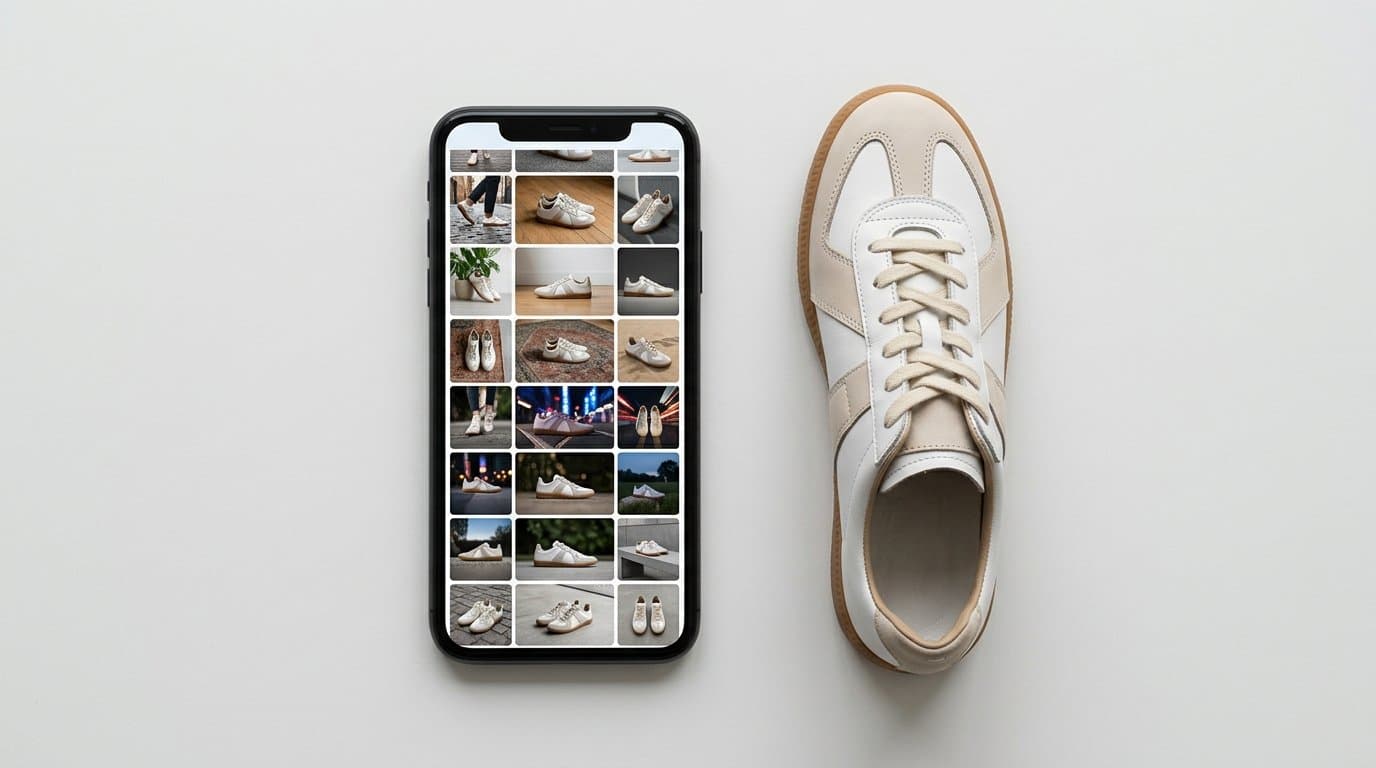
The Search Bar is Losing Its Monopoly
For years, e-commerce discovery meant typing a string of adjectives into a little white box. A customer wanted a mid-century modern tufted leather sofa, so they typed exactly that. But human language is messy. Shoppers routinely struggle to describe the exact drape of a cowl-neck silk slip dress or the specific matte finish of a ceramic pour-over coffee dripper. Words fall short.
Things are shifting rapidly. According to Ryder's August 2026 E-commerce Consumer Study, 64% of online shoppers now use AI-assisted shopping tools. Among those adopters, a massive 33% are relying on visual or image-based search. They're pointing their phone cameras at strangers' outfits on the subway. They're taking screenshots of minimalist home office setups on Pinterest. Then, they upload those images to Google Lens, Apple's Visual Look Up, Meta AI, or chat interfaces to find the exact product or its closest match.
Such a massive behavioral shift poses a direct threat to merchants who rely solely on traditional catalog setups. We've seen conversion drop off a cliff for brands that refuse to adapt their visual merchandising. If your entire inventory is represented by a single hero image on a sterile white background, you're practically invisible to these algorithms.
Why Packshots Fail the Visual Match Test
An image recognition algorithm tries to find overlapping data points between the user's input image and a merchant's product catalog. Let us consider a real scenario. A potential buyer takes a screenshot of a lifestyle influencer wearing a specific oversized, ribbed cashmere cardigan sitting in a warmly lit coffee shop.
The visual search engine breaks that image down into textures, lighting, context, and angles. It notes the way the fabric pools around the wrists. It registers the warm ambient daylight. It sees the coffee cup, the ceramic saucer, and the scratched wooden table.
Compare that to a standard catalog. If your only photo of that sweater is a flat-lay on a pure hex-code #FFFFFF background lit by harsh studio strobes, the AI struggles to connect the dots. The texture looks flat. The drape is completely absent. There is zero environmental context to match the lighting or mood of the user's uploaded photo. The algorithm will skip your product and surface a competitor's item because their catalog contained an image that more closely mirrored the input data.
We call this metric a catalog's visual surface area. A narrow visual surface area means you only have one or two rigid representations of a product. A broad visual surface area means you provide search algorithms with dozens of contextual hooks. On-model shots, flat-lays, varying lighting conditions, and diverse environmental setups give the AI plenty of visual anchor points to match against.
Historically, increasing this surface area was prohibitively expensive. Booking a studio, hiring models, paying photographers, renting specific locations, and securing props for just five variations of a single SKU could run into the thousands of dollars. You simply couldn't justify that cost for every item in a 500-product apparel catalog.
Shopify's 2026 Editions Forces the Issue
The urgency around visual surface area went from a low-level hum to a blaring siren during the Shopify Spring 2026 Editions release. Shopify completely rebuilt its infrastructure to support agentic commerce, rolling out the new Catalog API specifically optimized for visual search and AI discovery.
AI agents and chatbots can now ingest a user's uploaded image, query a Shopify merchant's catalog via this new API, and return an interactive product card that allows the user to check out directly within the chat interface. If a shopper asks an AI agent to find the boots from a viral TikTok video, the agent is directly scanning merchant media files to find a visual match.
The technical pipes are fully laid out. Your products can instantly appear in these chat-native checkouts, provided the AI can actually recognize your merchandise.
The bottleneck is your photography.
Expanding Visual Surface Area with AI Photography
Here is where the math of e-commerce photography completely changes. Generative AI tools allow you to take a basic product photo and extrapolate it into dozens of high-quality, photorealistic variations without ever picking up a camera.
Instead of paying for a massive editorial photoshoot, brands are using AI to create the contextual variations needed to capture visual search traffic. Tools in this space, from Photoroom and Pixelcut to Claid.ai and Botika, offer varying degrees of background generation and image enhancement. We built Modelize specifically to handle the heavy lifting for apparel and complex e-commerce catalogs, generating everything from accurate on-model fits to highly specific lifestyle environments.
But simply running a picture through an image generator isn't enough. To actually capture visual search traffic, you need a deliberate strategy.
Build Context-Specific Lifestyles
Think about the real-world environments where your product lives. If you sell waterproof hiking backpacks, your visual search traffic will likely come from people taking photos of gear out on a muddy trail, sitting on rocky terrain, or covered in light rain.
Generate variations of that backpack placed on a mossy log. Create another variation showing it worn by a hiker scrambling up a granite incline. Make a third shot featuring the bag in a dimly lit camping tent. Each of these variations gives Google Lens or a shopping AI a different set of visual anchors to latch onto when a customer uploads a similar outdoor photo.
If you sell skincare, don't just generate bottles on pristine marble pedestals. Create variations showing the serum bottle next to a steamy bathroom sink, held in a hand with water droplets, or sitting on a cluttered, realistic vanity table. The more messy, lived-in context you provide, the better the AI can map user-generated images to your product.
Multiply Your On-Model Representation
Apparel is notoriously difficult for visual search because clothing looks completely different depending on the body type, pose, styling, and motion. A dress on a plastic hanger doesn't look anything like a dress on a moving person.
Use AI to generate the same garment on different models. Show it on a petite frame, an athletic build, a plus-size form, and a tall silhouette. Have the AI generate poses where the model is sitting at a cafe table, walking down a street in motion, leaning against a brick wall, and looking casually over their shoulder. A customer might upload a paparazzi photo of a celebrity walking down a street wearing a specific jacket. If you have an AI-generated variation of your similar jacket shown in mid-stride on a city sidewalk, the visual match algorithm will prioritize your listing.
Footwear and accessories demand the exact same treatment. A pair of chunky leather loafers photographed entirely from a top-down studio angle will never perfectly match a user's street-style photo taken from ground level. You need AI to generate those specific low-angle street shots.
Light for the Real World, Not the Studio
Studio lighting is designed to show perfect product detail, but real-world photos are incredibly diverse. They're backlit by the afternoon sun. They feature harsh shadows from overhead fluorescent lights. They're tinged with the warm glow of a desk lamp or the cool blue of dusk.
Algorithms analyze lighting patterns to determine image similarity. You should intentionally generate product variations with radically different lighting conditions. Take a high-end stainless steel espresso machine. Generate one image where the machine is bathed in bright, diffused morning window light. Create another where it sits on a dark quartz countertop illuminated only by warm under-cabinet LEDs. Produce a third variation showing it in a moody, low-light cafe setting. You're casting a wider net for different types of user-generated screenshots.
The Operational Workflow for Merchants
We've found that implementing this requires a shift in how you upload and tag media in your store. You can't just dump forty chaotic images into a single product listing and hope for the best. That will destroy your page load speed, confuse human buyers, and ruin your conversion rate.
Here is a practical way to manage this expanded visual inventory.
First, keep your primary product page organized. Feature your standard white-background packshot as the primary image so the collection grid looks uniform. Include three to five of your best AI-generated lifestyle and on-model variations in the main image carousel. This gives human shoppers the exact context they need to make a purchasing decision.
Second, utilize your secondary channels and metadata. The beauty of the new Shopify Catalog API is that it indexes images across your entire digital ecosystem. You can push your massive library of AI-generated variations out through social media feeds, Pinterest boards, Google Merchant Center feeds, and even email campaigns. Even if a specific lifestyle image isn't sitting on your main Shopify product page, pushing it to your Google Shopping feed ensures the visual search algorithms still associate that contextual image with your product URL.
Third, monitor your search queries closely. Look at the specific visual searches driving traffic to your site through Google Search Console. If you notice a spike in people finding your ceramic cookware through images of rustic farmhouse kitchens, generate more variations matching that exact aesthetic. You can treat image generation the same way SEO marketers treat long-tail keywords. You're simply creating visual content to match specific visual queries.
Adapting to the New Default
The transition from text-based discovery to visual discovery is happening much faster than the shift from desktop to mobile did. Consumers are inherently visual creatures. When given the option to take a picture instead of typing an awkward description, they will choose the camera every single time.
Those 33% of early adopters currently using image-based search are just the leading edge. As AI agents become embedded in every social platform and chat interface, snapping a photo will become the default way we find things to buy.
Your catalog's visual surface area is your new defensive moat. Single packshots are a liability. By leveraging AI product photography to cheaply and rapidly generate dozens of contextual variations, you aren't just making your store look better. You are ensuring that when a customer asks an AI to find a product they saw out in the real world, your inventory is the very first thing that appears on their screen.
More in Shopify Growth
View all
How to Adapt Your DTC Product Photos for Shopify B2B Channels Using AI
With Shopify rapidly expanding its B2B capabilities, consumer brands are opening wholesale portals. Learn how to use AI to instantly transform your DTC product photos into bulk, retail-ready B2B imagery.
How to Add AI Virtual Try-On to Your Shopify Store
A practical guide to adding virtual try-on and size recommendation to a Shopify fashion store with OptiDress, from choosing the right type of try-on to setup, placement, and measuring results.

How AI Product Photos Protect Shopify Dropshippers from Reverse Image Search
Stop losing sales to AliExpress and Temu. Learn how transforming generic supplier images with AI photography breaks the reverse-search trail and protects your store's margins.
Generate Stunning Product Photos with AI
Modelize is a Shopify app that creates professional product images in seconds - AI models, backgrounds, and more. No photoshoot needed.