How the GPT Image 2.5 Update Upgrades Shopify Product Photography
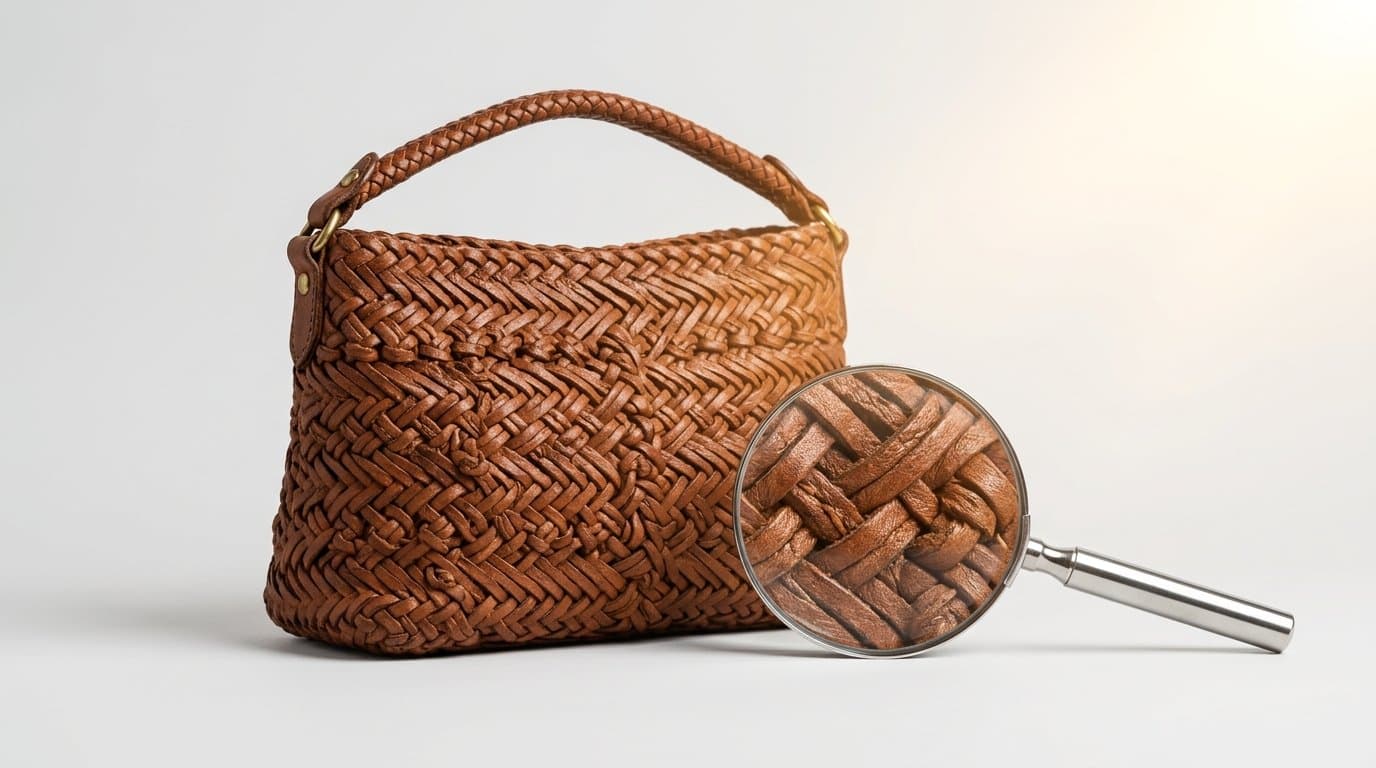
The Upscaling Headache is Finally Over
OpenAI quietly dropped a massive update on September 11, 2026, and the e-commerce photography workflow shifted overnight. GPT Image 2.5 arrived with two major structural changes that directly solve the most frustrating parts of generative product imagery. We now have access to the Sunburst precision model and true native 4K output.
Merchants already know the pain of taking a standard 1024x1024 AI generation and trying to stretch it across a modern storefront. You generate a great lifestyle shot of a new handbag. You run it through an upscaler to make it big enough for a homepage banner. You hope for the best.
Usually, the upscaler just guesses the missing pixels based on its own training data. It turns a subtle linen background texture into something resembling wet plastic. It hallucinated an extra zipper pull on the bag. It smoothed out the natural grain of the leather until the product looked like a cheap imitation of itself.
GPT Image 2.5 eliminates that entire messy middle step.
The model renders the image at high resolution from the very first pass. The AI understands exactly what physical product it is drawing and constructs the 4K image based on that specific reference, rather than trying to patch together a low-resolution thumbnail after the fact. You stop chaining five different tools together just to get a usable hero banner.
Enter the Sunburst Precision Model
OpenAI named the underlying architecture of this update Sunburst. It focuses heavily on geometric precision and material accuracy.
In past iterations, generative engines struggled wildly with structural consistency. If you asked for a wicker patio chair in a sunlit garden, you might get beautiful lighting but a chaotic mess of intersecting rattan weaves that made absolutely no physical sense upon close inspection. The geometry fell apart.
Sunburst respects the physical properties of physical goods.
We see this impact immediately with complex apparel and footwear categories. Consider a running shoe with a breathable mesh upper, woven laces, and a complex rubber tread. Previous iterations blurred the mesh holes together into a generic spongy texture. They made the rubber outsole look like soft clay. Sunburst maintains the structural integrity of those elements across the entire image. The mesh looks like actual fabric with distinct negative space.
Shoppers want to inspect the details. They want to see the heavy weave of a winter coat before they pay $300 for it. You can actually let them do that now without worrying that the image will degrade into digital mush.
Surviving the Mobile Pinch-and-Zoom
Mobile traffic dominates almost every Shopify storefront. Shoppers instinctively use two fingers to zoom in on product galleries to check the finish on a piece of jewelry or the stitching on a denim jacket.
If they zoom in and see a blurry mess, consumer trust evaporates immediately. If they see strange, melting artifacts around a buttonhole, they bounce.
High-fidelity details actually matter for conversion rates. We've spent years telling DTC brand owners that professional photography builds baseline trust with new customers. Generative imagery only succeeds if it maintains that exact same trust under a microscope.
With native 4K rendering, the pixels hold up to aggressive zooming. The zipper teeth look like individual, solid pieces of metal. The topstitching on a leather tote bag maintains a straight, logical line instead of dissolving halfway down the seam. You are presenting a factual representation of the item rather than an artistic approximation of it.
Why Native 4K Beats the Upscaler Ecosystem
For a long time, the standard playbook involved leaning heavily on third-party resolution tools. You generated an on-model shot or a flat-lay. Then you exported it and sent it over to platforms like Claid.ai or Pixelcut to double or quadruple the size.
Those tools do impressive work given what they have to start with. The problem is that they are inherently reactive. An upscaling algorithm does not know the true physical texture of your specific product. It looks at a slightly soft block of pixels and attempts to sharpen them based on generic patterns.
Sometimes the guess is entirely wrong.
A fine corduroy jacket might suddenly look like ribbed velvet after upscaling. A matte ceramic vase might pick up a strange, unwanted gloss.
Native 4K generation skips the guesswork completely. The Sunburst model generates the actual texture during the initial rendering phase because it is actively interpreting your prompt and your reference imagery right from the start.
This shifts how we handle daily production tasks. It's why we immediately integrated this GPT Image 2.5 update into Modelize to handle high-res lifestyle generation without the usual post-processing lag. You simply stop paying for separate upscaling credits. You stop spending twenty minutes pixel-peeping every single image to check for weird texture mutations.
Leaving the "Plasticky" Look Behind
Look at almost any AI-generated fashion campaign from early 2025. You will quickly spot a very specific, sterile aesthetic.
Skin looks perfectly smooth. Fabric lacks friction. Shadows feel slightly too soft around the edges. Everything carries a faint sheen of digital artificiality.
Marketing teams definitely noticed this trend, and customers certainly did too.
The Sunburst update introduces natural micro-imperfections back into the rendering process. This might sound counterintuitive, but absolute perfection is exactly what makes an image look fake to the human eye. Real photography features tiny variations in studio lighting, slight grain in the deep shadows, and microscopic dust on hard surfaces.
The new model accurately captures the way light interacts with distinct, contrasting surfaces in the same scene.
If you generate a flat-lay of a skincare serum bottle resting on a rough sandstone block, the sandstone actually looks porous. It absorbs the light. The glass bottle reflects the light sharply. That specific contrast between matte and gloss is incredibly hard to fake, yet the 2.5 update handles it natively without requiring manual dodging and burning in Photoshop.
Upgrading the Shopify Storefront Experience
Premium Shopify themes rely on large, edge-to-edge imagery. If you use Dawn, Prestige, or Symmetry, your store design fundamentally depends on giant visual assets.
When your hero image is soft or artificially smoothed, the entire brand feels cheap.
You used to need an expensive studio setup with a medium-format camera to fill those massive web components crisply. A standard DSLR shot heavily cropped for a banner would often lose its bite on a 27-inch retina display. Now, a properly prompted generation fills that space flawlessly. Backgrounds remain sharp, foregrounds pop, and the product itself commands attention without any visual compromise.
Rethinking Your Visual Merchandising
How should an e-commerce manager react to this update today?
Stop accepting soft, heavily processed imagery. The baseline for acceptable visual quality just moved up, and your competitors will be adopting these native 4K tools very quickly.
If you manage a catalog of hundreds of SKUs, updating every single product page might feel like an impossible task. Start with your top twenty sellers.
Look at the specific products with the highest return rates in your analytics dashboard. In our experience, returns frequently happen because the customer expected a different material or texture upon unboxing. They thought the fabric was heavy, but it was actually quite thin. They expected a matte finish on a table lamp, but it arrived glossy.
Use the Sunburst model to generate ultra-clear, highly detailed close-ups of these exact items. Put the product in a lifestyle context with strong, directional sunlight to aggressively highlight the grain of the material.
Clear visual expectations reduce returns. Crisp, accurate photography sets those expectations long before the checkout page.
Preparing for the Q4 Rush
The September 11 release date feels very deliberate. Black Friday and Cyber Monday campaigns are actively being built, tested, and finalized right now.
Brands usually lock in their holiday photoshoots by late August. If you missed that window, or if a crucial new product arrived late from the overseas manufacturer, you used to be in serious trouble. You would have to launch the product page with mediocre iPhone photos on a plain white background just to get it live in time for the sale.
This update completely changes the math for late-arriving inventory.
You can take a basic reference photo of a late product and generate a full suite of festive, high-resolution lifestyle images in a single afternoon. You can create on-model shots, cozy winter flat-lays, and aggressive hero banners without booking a last-minute studio.
More importantly, those generated images will actually look good when you blow them up for a major email campaign or a printed holiday mailer. The text on the product label will remain legible. The edges of the product won't artifact against the background.
The technology finally matches the rigorous standard of traditional commercial photography. The training wheels are officially off.
More in AI & Platform News
View all
How Google UCP Native Checkout Changes Your Shopify Image Strategy
With Google's recent rollout of native UCP checkout for Shopify, shoppers can now buy directly inside AI Overviews and Gemini without ever visiting your website. Here is how to adapt your Merchant Center images when your product page is no longer part of the buyer journey.

How Apple iOS 27 Visual Intelligence Changes Shopify Product Discovery
Apple just turned the iPhone camera into a native shopping engine. Learn how the new Visual Intelligence rollout in iOS 27 impacts e-commerce traffic and how to optimize your imagery for it.

How to Prepare Your Shopify Visuals for OpenAI's New ChatGPT Ads Network
As conversational AI platforms roll out native e-commerce ad formats, your product pages are becoming the foundation for chat-based creatives. Learn how to optimize your visual assets for AI ad managers.
Generate Stunning Product Photos with AI
Modelize is a Shopify app that creates professional product images in seconds - AI models, backgrounds, and more. No photoshoot needed.