Building a Visual Brand Identity on Shopify with Consistent Product Imagery
First Impressions Are Visual
A customer's first impression of your Shopify store happens in milliseconds, and it's almost entirely visual. Before they read a word of copy or check a single price, their brain processes the overall visual feel of your store and makes a snap judgment about quality and trustworthiness.
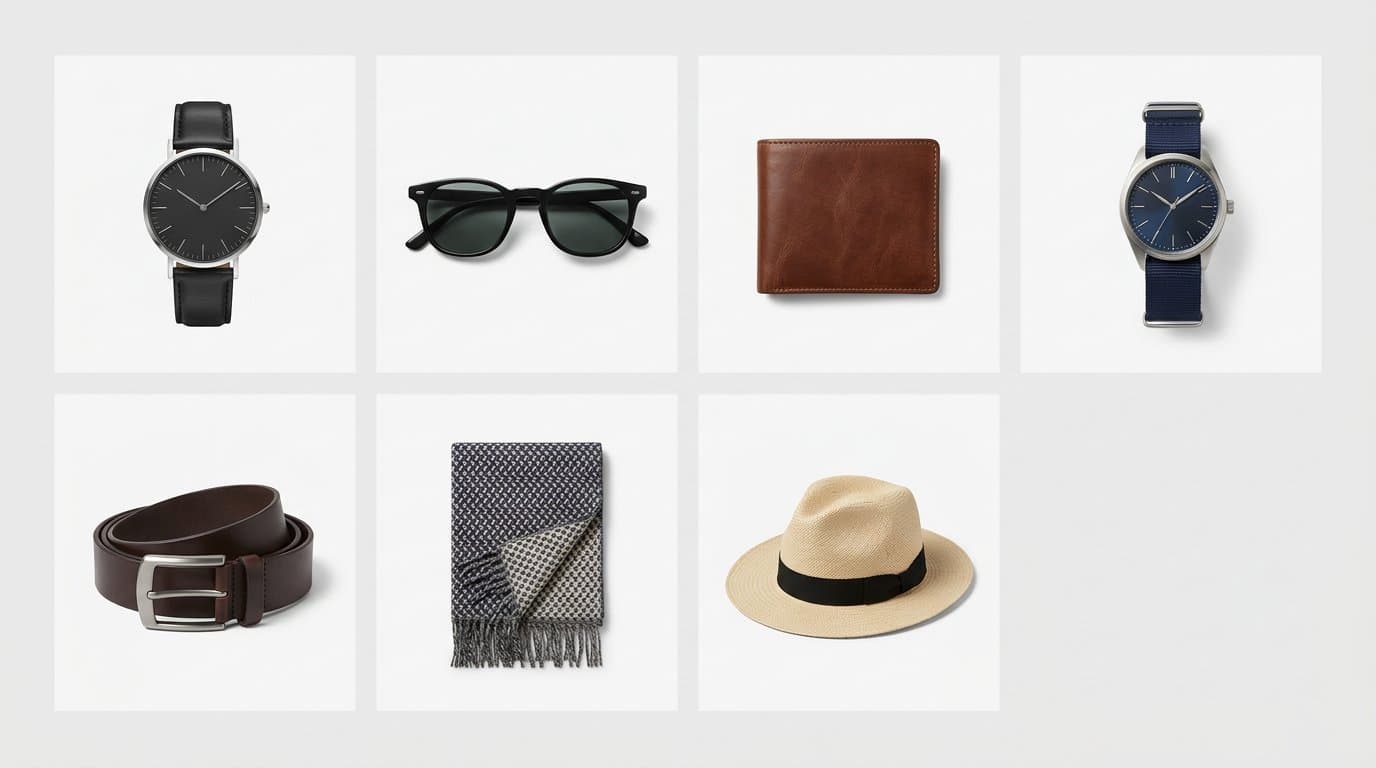
That first impression is built from the consistency — or inconsistency — of your product imagery. Stores where every product looks like it belongs together feel professional, curated, and reliable. Stores with a mix of different photography styles, backgrounds, and qualities feel disorganized, regardless of how good the products actually are.
What Visual Brand Identity Means
Visual brand identity in e-commerce is the consistent set of visual choices that make your store recognizably yours. It includes your color palette, typography, and logo — but extends deeply into how your products are photographed and presented.
The visual identity of your product photography encompasses background style and color, lighting direction and quality, composition and framing, color grading and post-processing, model selection and styling when applicable, and the overall mood and tone of your imagery.
When these elements are consistent, customers develop an almost subconscious recognition of your brand. They don't need to see your logo to know they're looking at your product — the image style itself communicates it.
The Consistency Problem
Most Shopify stores struggle with photographic consistency, and it's easy to understand why. Products get added over months and years. Different products might be photographed by different people, at different times, with different equipment and settings.
A dress photographed in natural light against a bedroom wall sits next to a jacket shot in a professional studio on white seamless. Next to those, a hat photographed on a phone with overhead kitchen lighting. Individually, each photo might be fine. Together, they look disjointed.
This inconsistency is particularly damaging on collection pages, where products appear side by side. Shoppers scanning a grid of products are more likely to engage with — and purchase from — stores where every image shares the same visual language.
Defining Your Visual Standards
Creating consistency starts with defining what "your style" actually looks like. Document a set of visual standards that cover every aspect of your product photography.
Background: Choose a specific background treatment and use it universally. Whether it's pure white, soft grey, or a branded color, consistency here has the single largest impact on perceived quality.
Lighting: Define your lighting approach. Is it bright and airy, warm and moody, or clean and neutral? Choose one direction and apply it to everything.
Framing: Decide how much space surrounds your products, what angle they're shot from, and how they're positioned in the frame. A product that fills 70 percent of the frame looks very different from one that fills 40 percent.
Color treatment: Apply the same color grading — brightness, contrast, saturation, warmth — to every image. Even slight inconsistencies in color treatment create a feeling of disorder.
Creating a Photography Style Guide
Write your visual standards into a simple photography style guide. This doesn't need to be a 50-page document — a one-page reference with example images is enough.
Include reference images that show exactly what "right" looks like. Specify measurable details: background color hex code, minimum resolution, aspect ratio, and product-to-frame ratio. If you use models, define the styling and posing direction.
This guide becomes essential when working with photographers, assistants, or AI tools. It eliminates the guesswork that leads to inconsistency and gives everyone a clear target to match.
Achieving Consistency with AI
AI product photography tools are uniquely suited to enforcing visual consistency at scale. Unlike human photographers who introduce natural variation, AI can apply identical settings to every image without deviation.
With Modelize, you can define your brand's visual parameters once and apply them uniformly across your entire catalog. Every product gets the same background, lighting style, and framing — automatically. This level of consistency rivals what only large brands with dedicated studio teams could previously achieve.
When your catalog grows or you add new products, AI ensures the new imagery matches your existing library perfectly. There's no learning curve for a new photographer, no calibration between shoots, and no post-production work to align different batches of images.
Color Consistency Across Your Store
Color deserves special attention because inconsistency here directly impacts customer trust. When the blue on your collection page doesn't match the blue on the product detail page, customers wonder what color they'll actually receive. This uncertainty increases cart abandonment and return rates.
Ensure consistent white balance across all images so that true white appears identically in every shot. Use the same color profile for post-processing. And verify that your product colors look accurate on common screen types — what looks right on your calibrated monitor might look very different on a customer's phone.
Model Photography Consistency
If your products include model photography, consistency extends to the models themselves. Frequent changes in model appearance, pose style, and shooting context create visual whiplash across your catalog.
Define your model photography standards: preferred body language, default poses for different product types, hair and makeup directions, and any recurring style elements. The goal is that a customer browsing your store sees models who feel like they belong together — part of the same brand world.
AI model generation makes this dramatically easier. Create a model profile that matches your brand and reuse it across your entire collection. Every product appears on a similar model in a similar style, creating seamless visual continuity.
Auditing Your Current Imagery
Before implementing new standards, audit what you currently have. Open your Shopify admin and view your collection pages. Do your product images look cohesive? Can you spot inconsistencies in backgrounds, lighting, color treatment, or framing?
Identify the images that best represent your desired brand aesthetic. These become your benchmark. Then sort the rest into categories: images that need minor adjustments, images that need to be reshot or regenerated, and images that are beyond saving.
Prioritize your most visible products — bestsellers, featured collections, and the items that appear on your homepage. Getting these right first creates the strongest immediate impact on brand perception.
The Business Impact
Investing in visual brand consistency isn't just about aesthetics — it's a revenue strategy. Stores with cohesive visual identities see higher average order values because customers trust the brand enough to buy more. They see lower return rates because consistent, accurate imagery sets proper expectations. And they build stronger brand loyalty because professional presentation creates emotional connection.
The compound effect of these improvements across your entire catalog makes visual consistency one of the highest-return investments a Shopify merchant can make.
Generate Stunning Product Photos with AI
Modelize is a Shopify app that creates professional product images in seconds - AI models, backgrounds, and more. No photoshoot needed.