Seasonal Product Photography: How to Adapt Your Visuals Throughout the Year
Why Seasonal Imagery Drives Sales
Shoppers respond to context. A cozy sweater photographed against a warm autumn backdrop sells differently than the same sweater on a plain white background. Seasonal imagery creates urgency, relevance, and emotional resonance that static product photos simply can't match.
Research shows that seasonally updated product photography can increase conversion rates by up to 15 percent during peak shopping periods. Customers perceive stores with current, relevant imagery as more active and trustworthy. A store that still shows summer vibes in December feels neglected — and shoppers notice.
The Traditional Seasonal Photography Problem
Historically, updating product imagery for each season meant scheduling new photo shoots multiple times per year. Every shoot required a photographer, a stylist, seasonal props, and potentially new backgrounds or locations.
For a store with 200 products, running even two seasonal refreshes per year meant 400 additional edited images — a massive investment in time and money. Most small and mid-size Shopify merchants simply couldn't afford to do it, leaving their stores looking static year-round.
This created an uneven playing field where large brands with photography budgets could refresh their visual content freely, while smaller stores were stuck with the same images month after month.
Planning Your Seasonal Calendar
Effective seasonal photography requires planning ahead. Map out the key shopping moments for your business and work backwards from each one.
For most e-commerce stores, the major seasonal moments are spring refresh in March through April, summer and outdoor season from May through July, back-to-school in August, fall and autumn vibes in September through October, the holiday shopping season from November through December, and New Year and winter in January through February.
Not every season is equally important for every product category. A swimwear brand should invest heavily in summer imagery but might skip fall entirely. A home decor store might focus on holiday and spring. Identify which seasons drive the most revenue for your specific products and prioritize accordingly.
Spring and Summer Photography
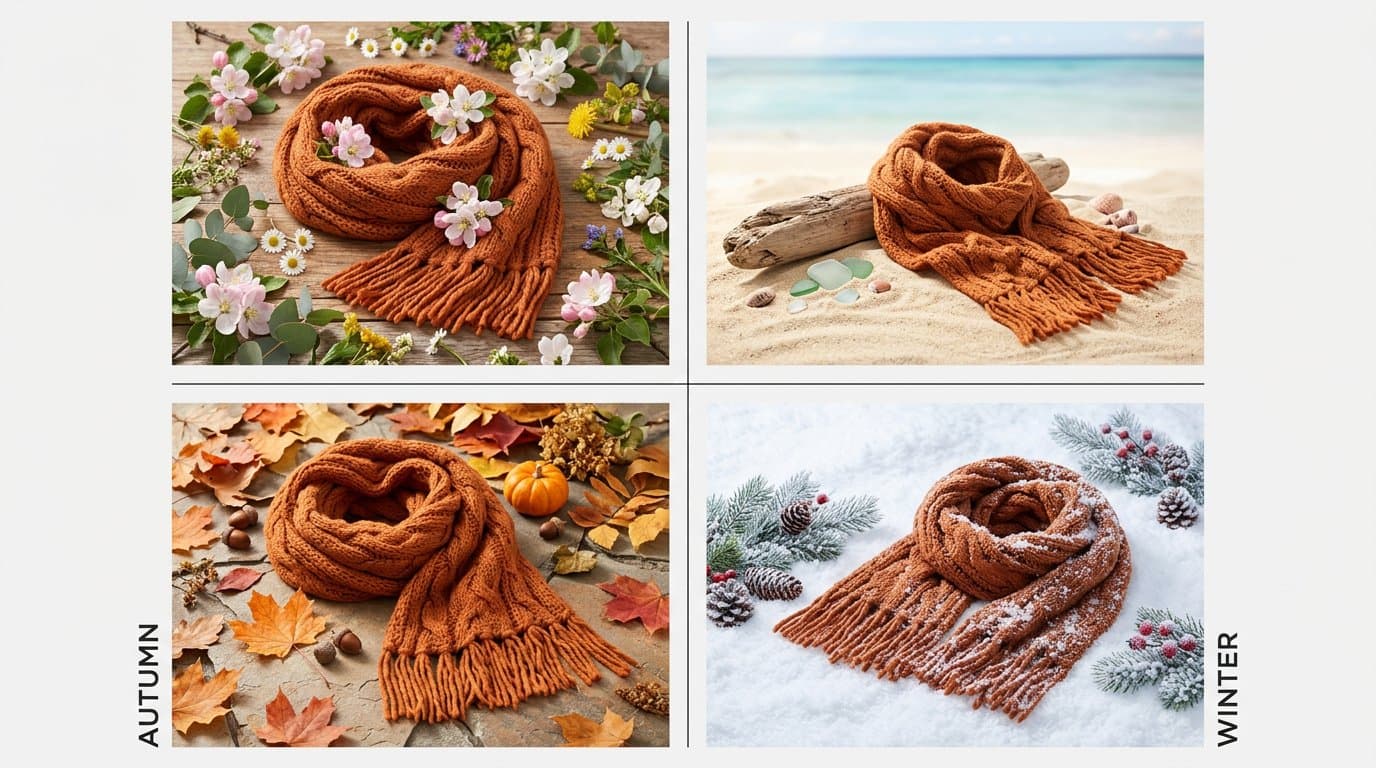
Spring imagery is about freshness, renewal, and light. Think bright natural lighting, green elements, floral touches, and outdoor settings. Color palettes tend toward pastels, whites, and soft colors.
For product photography, spring means lighter backgrounds, more natural light styling, and settings that suggest warmth and openness. Even subtle changes — a lighter background color, a small plant in the composition — signal the season to shoppers.
Summer takes that energy further with bolder colors, outdoor and beach settings, golden-hour lighting tones, and bright, saturated product presentations. Summer imagery should feel energetic and aspirational.
Fall and Holiday Photography
Autumn brings warm tones, textured materials, and cozy atmospheres. Rich oranges, deep reds, warm browns, and golden light define this season's visual language. Products photographed with wool textures, warm wood surfaces, or fallen leaves instantly communicate the season.
Holiday photography is its own category. The November through December period drives more e-commerce revenue than any other time, making it the most important season to get right visually.
Holiday imagery doesn't need to be heavy-handed. Subtle touches — a hint of greenery, warm metallic accents, soft fairy lights in the background — create a festive feel without overwhelming the product. Avoid clichéd holiday elements that make your imagery feel generic.
Using AI for Seasonal Refreshes
This is where AI fundamentally changes the economics of seasonal photography. Instead of organizing new shoots for each season, you can use AI to place your existing product photos into seasonal contexts.
With Modelize, you can take your static studio shots and generate seasonally appropriate lifestyle images. The same white t-shirt can appear in a sunny outdoor setting for summer and a cozy indoor scene for winter — without rephotographing anything.
This makes seasonal refreshes accessible to stores of any size. You invest in one good set of studio photos and then use AI to create unlimited variations for every season, campaign, or promotion throughout the year.
Timing Your Updates
Shoppers start searching for seasonal products well before the season arrives. Holiday gift searches begin in October. Summer fashion browsing starts in April. Update your imagery ahead of peak demand, not during it.
A good rule of thumb is to refresh your seasonal imagery four to six weeks before the season's peak shopping period. This gives search engines time to index new images and gives returning customers fresh visuals when they start their seasonal shopping.
Maintaining Brand Consistency Across Seasons
Seasonal updates should feel like your brand adapting to the moment, not like a different store entirely. Maintain your core visual identity — your typography, layout, and brand colors — while adapting the photographic style and context.
Define a set of seasonal templates that align with your brand aesthetic. If your brand is minimalist, your seasonal touches should be subtle. If your brand is bold and colorful, lean into seasonal palettes more aggressively. Consistency in approach, even as the specifics change, keeps your brand recognizable.
Measuring Seasonal Impact
Track the performance of your seasonal imagery against your standard product photos. Key metrics to watch include conversion rate by season, click-through rates on seasonally updated listings, time on page for products with seasonal imagery, and return rates comparing seasonal versus standard photography.
A/B testing seasonal versus evergreen images on the same products gives you hard data about what works for your specific audience. Most merchants find that seasonal updates provide a meaningful lift, but the magnitude varies by product category and customer demographic.
Building a Sustainable Rhythm
The most effective approach is to build seasonal photography into your regular workflow rather than treating it as a special project. Set reminders to plan each seasonal refresh, prepare your imagery ahead of time, and swap it out systematically.
With AI tools, this rhythm becomes almost effortless. A quarterly refresh that once required days of shooting and editing can happen in an afternoon. The result is a store that always feels current, relevant, and in tune with what shoppers are looking for right now.
Generate Stunning Product Photos with AI
Modelize is a Shopify app that creates professional product images in seconds - AI models, backgrounds, and more. No photoshoot needed.