Product Photography Lighting Guide: Techniques for E-Commerce Success
Lighting Makes or Breaks Your Product Photos
You can own the best camera, the most beautiful product, and a flawless background setup — but if your lighting is wrong, the image fails. Lighting determines how textures are rendered, how colors appear, how dimensions are perceived, and ultimately, how professional your product images look.
The difference between an amateur product photo and a professional one is almost always lighting. It's the single most impactful variable in product photography, and understanding it transforms your results immediately.
Natural Light: The Accessible Starting Point
Natural light from a window is the easiest lighting setup to work with, and it produces remarkably professional results when used correctly.
Position your product near a large north-facing window for the most consistent, even light throughout the day. The light should fall on the product from the side, creating gentle shadows that reveal texture and shape without harsh contrasts.
Diffuse the light if it's too direct. A sheer white curtain, a sheet of tracing paper, or a commercial diffusion panel softens hard sunlight into the smooth, even illumination that product photography demands.
Use a reflector on the opposite side of the light source to fill in shadows. A white foam board works perfectly. Position it facing the product so it bounces light back into the shadowed areas, reducing contrast and creating a more evenly lit image.
The main limitation of natural light is consistency. Light quality changes throughout the day and between days. If you're shooting a large catalog over multiple days, maintaining identical lighting conditions is challenging.
One-Light Studio Setup
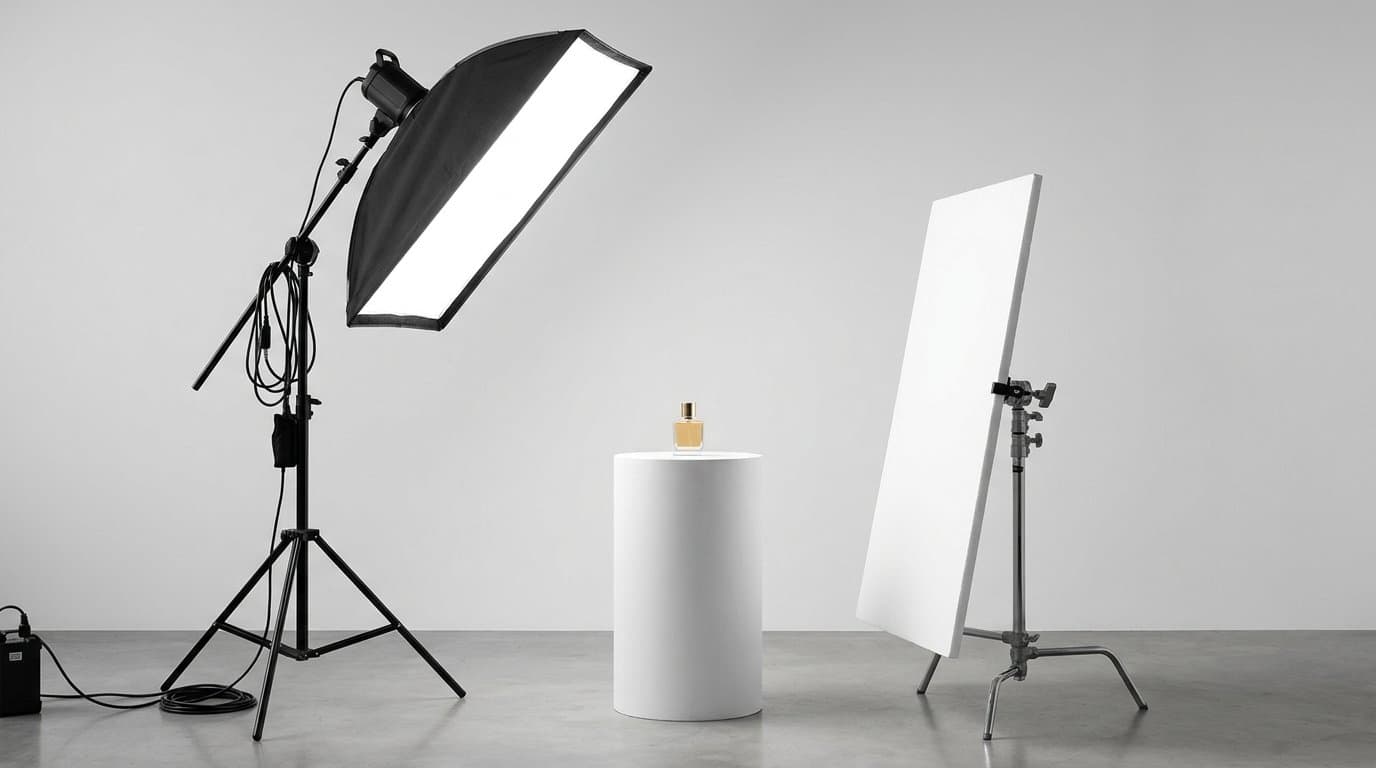
A single continuous light or strobe with a softbox is the most common professional product photography setup. It's consistent, repeatable, and versatile enough for most product types.
Position your light at a 45-degree angle to the product, elevated slightly above product height. This creates dimension-revealing shadows while keeping the overall exposure even. Attach a softbox or shoot-through umbrella to diffuse the light and eliminate harsh edges.
Place a reflector or a second piece of white foam board on the opposite side to fill shadows. The reflector's distance from the product controls how much fill you get — closer means softer shadows, farther means more contrast.
This setup costs less than you might expect. A basic continuous LED light with a softbox can be purchased for under a hundred dollars, and it will handle the majority of product photography needs.
Two-Light Setup for Professional Results
Adding a second light gives you much greater control over shadows and dimension. The classic two-light setup uses a key light and a fill light.
The key light is your main light source, positioned at 45 degrees as described above. It provides the primary illumination and determines the character of your lighting.
The fill light is softer and less intense, positioned on the opposite side. Its job is to lighten the shadows created by the key light without eliminating them entirely. Set the fill light about one to two stops dimmer than the key light for a natural, professional look.
A third accent light, often called a rim light or hair light, can be added behind the product aimed at its edges. This creates a subtle bright outline that separates the product from the background, adding dimension and polish.
Lighting Different Product Types
Different materials respond to light in fundamentally different ways, and your lighting approach should adapt accordingly.
Matte products like clothing, bags, and paper goods are the most forgiving. They absorb light evenly and don't produce distracting reflections. Standard soft lighting works well — the main concern is revealing texture and accurate color.
Reflective products like jewelry, watches, sunglasses, and electronics are the most challenging. Every light source reflects in their surface, potentially creating distracting bright spots or showing your entire studio in the reflection. Use large, diffused light sources positioned so their reflections appear where you want them. A light tent or light box surrounds the product in diffused light from all sides, minimizing unwanted reflections.
Transparent products like glass bottles, clear containers, and translucent materials need backlighting to look their best. Light from behind the product makes it glow, revealing the liquid inside or the container's form. This is distinctly different from front-lighting, which tends to make glass look flat and lifeless.
Understanding Color Temperature
All light has a color temperature, measured in Kelvin. Getting this right is critical for accurate product colors.
Daylight is approximately 5500K and produces neutral, true-to-life colors. Tungsten bulbs emit warmer light around 3200K, adding an orange cast. Fluorescent lights often produce a green tint. LED panels vary widely depending on quality and settings.
For product photography, aim for daylight-balanced lighting at 5000K to 5500K. This produces the most accurate colors and matches the standard that monitors and printing systems are calibrated for.
Never mix light sources of different color temperatures. Combining a daylight-balanced LED with warm tungsten room lighting creates uneven color casts that are extremely difficult to correct in post-production. Turn off all ambient lights and work exclusively with your photography lighting.
The Role of Shadows
Shadows are not the enemy — they're a critical part of communicating a product's three-dimensional shape. A product photographed with completely shadowless lighting looks flat and unrealistic. The key is controlling shadows so they enhance rather than distract.
A small, soft shadow beneath a product grounds it in the scene and makes it look like a physical object rather than a floating cutout. Gradual light falloff across the product surface reveals its contours and form.
Hard shadows with sharp edges look amateur and distracting. Soft, gradual shadows look natural and professional. The size of your light source relative to your product determines shadow softness — larger light sources produce softer shadows.
Post-Processing Light Corrections
Even with careful lighting, some adjustments in post are normal. Adjust exposure to ensure the product is properly bright without losing detail in highlights. Correct white balance to neutralize any remaining color casts.
If some shadows are too deep, lift them selectively. If highlights are slightly blown, bring them down. These are normal refinements, not fixes — the goal of good lighting is to minimize the post-processing needed, not to create images that depend on it.
AI tools like Modelize can handle these corrections and more, automatically adjusting lighting, shadows, and highlights to match a professional standard. But starting with well-lit source images always produces better final results.
Building Your Lighting Kit
For merchants just starting out, a basic lighting kit doesn't require a large investment. One continuous LED panel or ring light, one white foam board reflector, and a tabletop shooting area is enough to produce clean, professional product images.
As your needs grow, add a softbox, a second light, and a light tent for reflective products. Each addition gives you more control and better results, but even the most basic single-light setup can produce excellent images when used correctly.
The most important investment isn't in equipment — it's in understanding how light works and practicing until you can consistently achieve the results you want.
Generate Stunning Product Photos with AI
Modelize is a Shopify app that creates professional product images in seconds - AI models, backgrounds, and more. No photoshoot needed.