A/B Testing Product Images on Shopify: A Data-Driven Guide
Why Most Stores Never Test Their Images
Despite product images being the single biggest influence on purchase decisions, most Shopify store owners never run a single image test. They choose photos based on gut feeling, set them, and forget them.
This is a missed opportunity. Small improvements in product image performance compound across every page view, every session, and every product. A 10% improvement in conversion rate from better primary images can translate into tens of thousands of dollars in additional revenue annually.
Here's a practical, actionable guide to A/B testing product images on your Shopify store.
What to Test: The High-Impact Variables
Not all image variables are worth testing. Focus your experiments on changes that are likely to produce measurable differences.
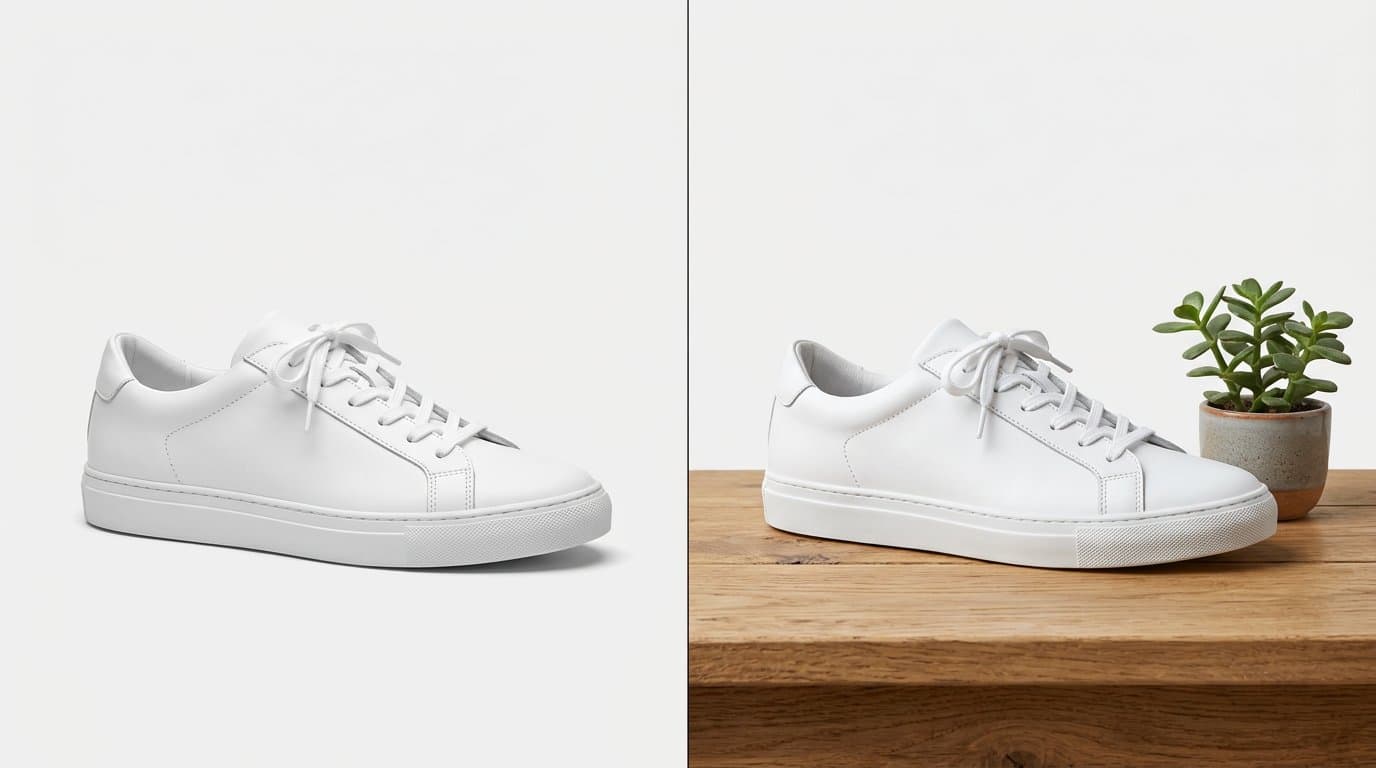
Primary image style is the highest-impact variable. Test whether a white-background studio shot, a lifestyle image, or an on-model shot performs better as the first image customers see. Different product categories often respond differently — apparel may convert better with on-model shots, while electronics might perform best with clean studio images.
Background treatment is another high-impact variable. Pure white vs. light gray vs. lifestyle backgrounds can significantly affect perceived value and purchase intent. Premium products sometimes convert better with contextual lifestyle backgrounds, while commodity products benefit from clean white backgrounds.
The number of images per product matters more than most people think. Test whether adding a 4th, 5th, or 6th image changes conversion. There's typically a diminishing returns point, and it varies by product category.
Image order in the gallery affects engagement. The first image gets the most views — test different sequences to see which image in the opening position drives the highest conversion.
Setting Up Your Test
A valid A/B test requires a few fundamentals.
First, choose a meaningful metric. Conversion rate is the obvious choice, but also track add-to-cart rate, time on product page, and return rate. Sometimes an image that boosts conversion also increases returns if it creates unrealistic expectations.
Second, ensure sufficient sample size. You need enough traffic to reach statistical significance. For most Shopify stores, plan to run tests for at least 2 weeks, ideally 4. Use a sample size calculator to determine how many visitors you need based on your current conversion rate and the minimum effect size you want to detect.
Third, change only one variable at a time. If you test a new primary image style AND change the number of images simultaneously, you won't know which change drove the result.
Running Tests on Shopify
Shopify doesn't have built-in image A/B testing, but several approaches work well.
Dedicated A/B testing apps in the Shopify App Store can split traffic between different product page versions. These handle the randomization, tracking, and statistical analysis for you.
A manual approach works for stores with moderate traffic: run version A for two weeks, then switch to version B for two weeks. This isn't as rigorous as simultaneous testing but can still reveal significant differences.
The most practical approach combines testing with AI-generated variations. Use Modelize to quickly generate multiple versions of your product images — different styles, backgrounds, and compositions — then test them against each other. AI makes creating test variations trivially easy and fast.
Interpreting Results
Statistical significance is non-negotiable. A 2% conversion lift that isn't statistically significant is just noise, not a finding. Use a significance calculator (95% confidence level is standard) before declaring any winner.
Look at the full picture, not just conversion rate. An image that increases conversion by 5% but also increases returns by 3% has a net impact that's much smaller than it appears. Track return rates alongside conversion for at least one full return window (typically 30 days) after concluding your test.
Consider segment differences. A lifestyle primary image might convert better for mobile visitors while a studio shot wins on desktop. If your analytics supports segmentation, check for these differences — they can inform device-specific optimizations.
What Winning Tests Actually Look Like
Based on data from thousands of e-commerce tests, here are patterns that frequently emerge.
On-model photography typically outperforms flat-lay for apparel, with conversion lifts of 10-25%. Customers want to see how clothes fit and drape on a body.
Products with 4-5 images significantly outperform those with 1-2, with diminishing returns kicking in above 6-7 images for most categories.
Lifestyle primary images often outperform white-background shots for premium products, while white backgrounds win for commodity items where customers are primarily comparison shopping on price.
Building a Testing Culture
The highest-performing e-commerce teams don't run one-off tests — they build continuous testing into their workflow. Every new product launch is an opportunity to test image styles. Every seasonal refresh is a chance to experiment with different backgrounds.
Set a quarterly testing cadence: identify your top 10 products by traffic, run image tests on 2-3 of them each quarter, and apply winning approaches across similar products. Over time, this compounds into a significantly optimized visual catalog.
The combination of AI-generated image variations and systematic testing creates a powerful optimization loop. Generate variations quickly, test them rigorously, and apply winners at scale. This is how data-driven stores consistently outperform competitors who rely on assumptions about what "looks good."
Generate Stunning Product Photos with AI
Modelize is a Shopify app that creates professional product images in seconds - AI models, backgrounds, and more. No photoshoot needed.